How to choose health and safety software in NZ

To choose health and safety software, start with the records and processes your company needs, then test options with the people who'll use them: workers, the office admin and management. Check it fits New Zealand law, works where your team works, and has pricing that suits how you grow.

Do you need health and safety software?

You don't need software to meet New Zealand health and safety law. The Health and Safety at Work Act 2015 (HSWA) sets duties, not tools. Software earns its place when paper, spreadsheets and email can no longer show you what's happening, or when keeping them up to date has become a job in itself.

Our guide to the Health and Safety at Work Act covers the duties themselves. Common signs it's time to look at software:

  • Paper is getting on top of you: forms are lost, damaged or sitting in utes, and nobody can find last month's toolbox talk.
  • One person carries it all: health and safety has landed on the office admin or a manager on top of their real job.
  • You can't see across sites: you don't know which pre-starts were done, who's inducted or what's overdue until something goes wrong.
  • Clients and auditors are asking for more: SSSPs, inducted contractors, Tōtika or SiteWise evidence, and board reports take days to pull together.
  • The law is changing: from 1 April 2027 the Health and Safety at Work Amendment Act 2026 puts critical risks first, and you want a clear record of how you manage them.

If none of these applies, a well-run paper system may still suit you. Software is a tool, not a requirement.

What should you sort out before you start looking?

Before you look at any product, write down what you need it to do. A short list of your processes, people and problems keeps demos focused on your company rather than on the vendor's favourite features. Prospects often run several demos in the same week, and without a list they all blur together.

Work through these first:

  1. List your processes: toolbox talks, pre-starts, inductions, hazard register, risk assessments and JSAs, incidents and near misses, training records, equipment, contractors.
  2. Count your users: office staff, managers, field workers and contractors who'll sign in but not log in.
  3. Map your sites: how many, how remote, and whether there's mobile coverage.
  4. Name your must-haves: the three or four things that would make you walk away if missing.
  5. Set a budget and a start date: including who'll run the setup and when they'll have time.
  6. Involve your workers: WorkSafe says PCBUs should engage with workers when proposing changes that may affect their health and safety. A new system is one of those.

Gather your existing forms

Pull together your current forms, registers and templates. Most vendors will ask for them, and seeing how each one handles your real forms tells you more than a generic demo.

What features matter most?

The features that matter most are the ones that match the work your team does every day. For most NZ companies that means digital forms, registers that update from those forms, reminders, and reporting you can hand to a client or auditor. Fancy dashboards matter far less than whether workers will fill in the forms.

A practical checklist:

  • Digital forms you can build yourself: toolbox talks, pre-starts, JSAs, inspections and incident reports, with photos and signatures.
  • Forms that hide questions that don't apply: a worker shouldn't answer trenching questions on a job with no trench.
  • Scheduling and reminders: recurring forms that appear when they're due, with escalation if they're missed.
  • Connected registers: hazards, training, equipment and incidents that update from completed forms, so nobody types the same data twice.
  • Incident reporting and corrective actions: report from the field, then assign actions with owners and due dates.
  • Visitor and contractor sign-in: ideally without making every visitor download an app.
  • Reporting and exports: registers and reports you can filter by site and date and export for audits, clients and the board.
  • Records you can keep: WorkSafe requires records of notifiable events for at least five years, so check how long data is kept and how you'd get it out.

Match features to your industry

A civil contractor needs plant pre-starts and permits. A manufacturer needs equipment registers and SOPs. A farm or orchard needs inductions for seasonal staff and forms that work without coverage. A professional services firm may only need incident reporting, a hazard register and training records. Ask each vendor to show your use case, not theirs.

Will your team actually use it?

Your team will use health and safety software if it's quicker than the paper it replaces and it only asks them what's relevant. Adoption is where most rollouts succeed or fail. Admins on sales calls describe the fear well: it could become a full-time job just making sure people fill in the forms.

‍

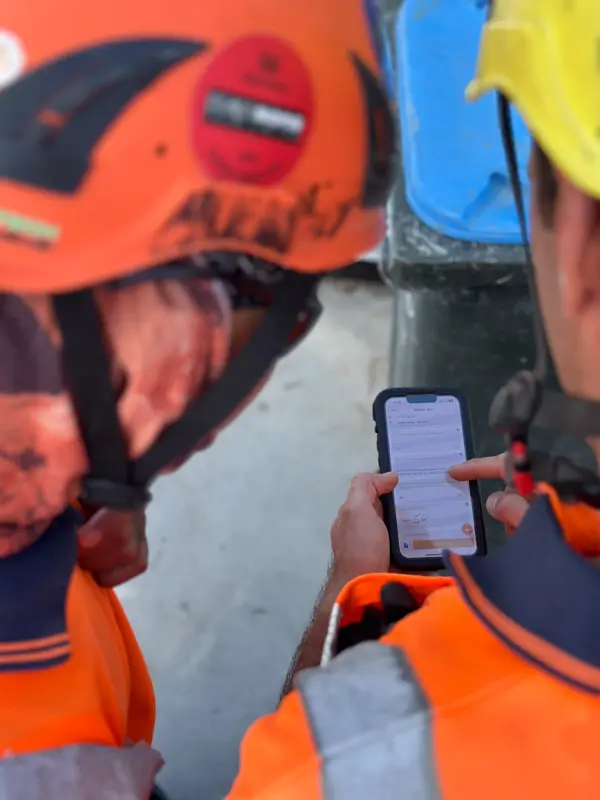
Two workers in hi-vis and helmets checking a completed safety form with a signature on a phone

‍

Questions to test during a trial:

  • How long does a pre-start take on a phone? Time it with a real worker, not the person running the demo.
  • Does it work without coverage? Quarries, forests, farms and basements often have none. Check forms can be completed offline and sync later. Our guide to health and safety forms with no coverage covers what to look for.
  • How do visitors and subcontractors sign in? A QR code in a mobile browser is quicker at the gate than an app download.
  • Can visiting teams sign documents easily? A site manager won't email the same SWMS four times to four subcontractor workers.
  • Is the training readily understandable? Regulation 9 of the General Risk and Workplace Management Regulations requires training to be readily understandable. The same thinking applies to the app: if it needs a manual, the team won't use it.
  • What happens when someone doesn't complete a form? Look for reminders and escalation, not just a red mark on a dashboard.

How much does health and safety software cost?

Health and safety software in New Zealand is usually priced per user, per site or project, or as a flat plan with a set number of users. The model matters as much as the headline price. Per-project pricing can rise every time you win work, while user-based pricing stays steady as you add sites.

Price is the most common reason buyers walk away, often because they feel they're paying for features they won't use. To compare fairly:

  • Compare the pricing model: per user, per site or project, or tiered plans. Model your costs for next year's workload, not just today's.
  • Check what's included: some features, such as training modules or integrations, may be paid add-ons.
  • Ask about setup costs: is onboarding included, and will the vendor upload your existing forms?
  • Ask about contract terms: monthly or annual billing, minimum terms and what happens if you leave.
  • Count the hidden cost of not changing: admin hours spent chasing forms, compiling registers and preparing for audits.

Site App Pro's own pricing is flat-rate and user-based rather than per project, with training and integrations available as paid add-ons.

How do you compare vendors fairly?

Compare vendors fairly by testing each one against the same list of needs, with the same people, using your own forms. A side-by-side trial shows real differences. A demo shows a well-rehearsed path through the product, which isn't the same thing.

Questions to ask every vendor:

  1. Is it built for New Zealand? Does it use HSWA, PCBU, WorkSafe and NZ terms, or is it translated from another market?
  2. Where is support based, and when is it available? Ask who you'll talk to when something breaks on a Monday morning.
  3. What does setup involve? Who builds the forms, how long it takes and what you need to provide.
  4. Can you get your data out? Exports in standard formats, and what happens to your records if you leave.
  5. What do similar companies say? Ask for references in your industry and size.
  6. What's on the roadmap, and what isn't? Don't buy on promises. Judge the product on what it does today.
  7. How is your data stored and backed up? Ask where records are held, how often they're backed up and who at the vendor can access them.

Be wary of one-size-fits-all

Rigid templates, per-site pricing and systems built for large corporates can be hard work for a 20-person company. Equally, a tool built only for one trade may not grow with you. Look for something that fits how you work now and where you're heading.

How do you roll it out without stopping work?

You roll out health and safety software without stopping work by starting small: one site or one process, a few willing users, then expanding. Being too busy is the second most common reason companies put off a new system, so plan the rollout around the work, not the other way round.

A practical rollout plan:

  1. Start with the forms people use most: usually pre-starts, toolbox talks and site sign-in.
  2. Pick a pilot site and a champion: someone on the ground who'll show others and give honest feedback.
  3. Show the team in five minutes: a quick demo at a toolbox talk is often enough for field users.
  4. Run paper and digital side by side briefly: then switch fully on a set date so you're not double-handling.
  5. Add the next process: incidents, inductions, training records and equipment, one at a time.
  6. Review after 30 days: check completion rates, fix forms that cause friction and ask the team what's working.

Avoid starting during your busiest month. If that's December, a January start with forms already uploaded can work better than a rushed December launch.

What training looks like

Most field users need a short walk-through, not a course. Show them how to sign in, find their to-do list and complete one form. Office users who build forms and run reports need more time, usually a session or two with the vendor's support team, plus a simple guide for new starters.
What are common mistakes when choosing software?

The most common mistake is choosing on features rather than fit. A system with every feature fails if the team won't use it, if it doesn't work where they work, or if the price climbs every time you win a contract. Other common mistakes are below.

  • No requirements list: demos drive the decision instead of your needs.
  • Leaving out the field team: the people who'll fill in the forms never see the app before purchase.
  • Ignoring coverage: the app works in the office but not in the quarry, forest or basement.
  • Underestimating setup: nobody has time to build forms, so the system sits half-configured.
  • Not checking the exit: no clear way to export your records if you change systems later.
  • Expecting software to do the work: software records and reminds. It doesn't replace good controls, supervision or worker engagement.

How Site App Pro helps you choose and roll out

Site App Pro is digital health and safety management software built for New Zealand companies. You can test it against your own checklist before you commit.

  • Try it with your forms: we set you up and upload your existing forms during a free trial, so you test with real processes.
  • Field-friendly forms: forms hide the questions that don't apply, work offline and sync when back in coverage, and visitors sign in with a QR code, no app needed.
  • Connected records: forms connect to your hazard, equipment and training registers, with exports for audits, clients and the board.

See how health and safety software works in Site App Pro.

Find a health and safety consultant

A health and safety consultant can help you map your processes and critical risks before you choose software, so you buy for what you need. Find a health and safety consultant who knows your industry.

Try Site App Pro for free

Start a 14-day free trial with no credit card required. We set you up and upload your existing forms for you, free of charge, so you can test with your real processes. Pricing is flat-rate and user-based rather than per project, and our NZ-based support team is here when you need help. Start your free trial.

Disclaimer: Site App Pro does not provide health and safety or compliance advice. This guide has been provided for information purposes only. You should consult your own professional health and safety advisors for advice directly relating to your company or before taking action in relation to any of the content provided.

Citations and references

Worker engagement and participation fact sheet, WorkSafe New Zealand, https://registers.worksafe.govt.nz/managing-health-and-safety/businesses/worker-engagement-and-participation/worker-engagement-and-participation-fact-sheet, date not shown, accessed 18 November 2026.

What events need to be notified?, WorkSafe New Zealand, https://www.worksafe.govt.nz/notifications/what-events-need-to-be-notified/, updated 30 October 2026, accessed 18 November 2026.

Health and Safety at Work (General Risk and Workplace Management) Regulations 2016, regulation 9, New Zealand Legislation, https://www.legislation.govt.nz/regulation/public/2016/0013/latest/whole.html, reprint as at 1 December 2020, accessed 18 November 2026.

What is a critical risk?, WorkSafe New Zealand, https://www.worksafe.govt.nz/laws-and-regulations/acts/changes/what-is-critical-risk/, updated 17 September 2026, accessed 18 November 2026.

Changes to health and safety law: 1 April 2027, Duncan Cotterill, https://duncancotterill.com/insights/changes-to-health-and-safety-law-1-april-2027/, published 16 September 2026, accessed 18 November 2026.

FAQS

No software can make a company compliant on its own. Compliance with the HSWA depends on how you identify and manage risks, engage workers and supervise the work. Health and safety software helps you record, track and evidence those processes, which makes it easier to show what you do.

‍

Small companies don't need health and safety software to meet the HSWA. Many manage well with paper or simple templates. Software becomes worthwhile when records are hard to keep up to date, health and safety falls on one busy person, or clients and prequalification schemes ask for evidence you can't easily produce.

‍

Setting up health and safety software can take anywhere from a few days to a few months, depending on how many forms, sites and users you have and who builds the forms. Starting with one site and your most-used forms, and asking the vendor to upload existing forms, shortens it.

‍

The best health and safety software in NZ is the one that fits your company's processes, works where your team works and has pricing that suits how you grow. Test a shortlist against the same requirements and your own forms, and involve the workers who'll use it every day before you decide.

‍

Site supervisor in a hard hat using a tablet above a busy construction site

Health and safety management software for small to enterprise New Zealand companies.

  • One online location
  • Customisable forms and dashboards
Book a demo